1. Introduction
In Python programming, List and Tuple are used to store multiple values in a single variable. They are important concepts for beginners, college students, and people preparing for Python interviews.
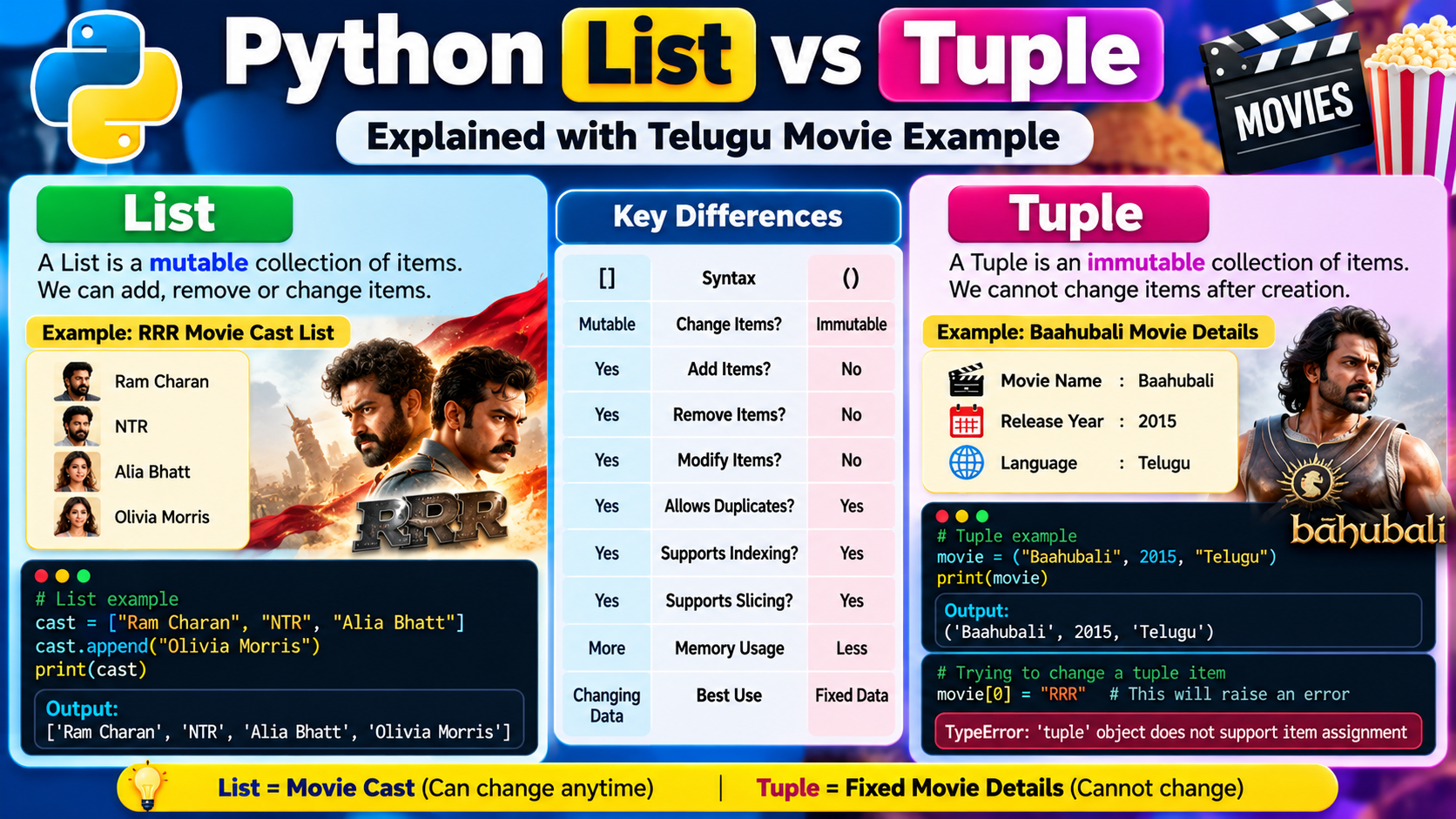
Let us understand them using examples from Telugu movies such as RRR, Baahubali, and Pushpa.
Imagine you are creating a website that stores movie information. You want to save movie names, actor names, release years, ratings, and collections. Instead of creating a separate variable for every value, you can use a List or a Tuple.
For example, without a List:
movie1 = "RRR"movie2 = "Baahubali"movie3 = "Pushpa"This works, but managing many movie names becomes difficult.
Instead, Python lets you store all the names in one List:
movies = ["RRR", "Baahubali", "Pushpa"]print(movies)Output:
['RRR', 'Baahubali', 'Pushpa']You can also store these values in a Tuple:
movies = ("RRR", "Baahubali", "Pushpa")print(movies)Output:
('RRR', 'Baahubali', 'Pushpa')Both examples store multiple movie names, but they behave differently when you try to modify their contents.
The most important difference is:
- List: Mutable, which means you can change its contents.
- Tuple: Immutable, which means you cannot change its individual items after creation.
Let’s understand each concept step by step.
2. What Is a List in Python?
A List is an ordered, mutable collection of items in Python. It allows you to store multiple values in a single variable.
A List can contain strings, integers, floating-point numbers, Boolean values, and even other Lists.
The syntax of a List uses square brackets [].
Example:
movie_names = ["RRR", "Baahubali", "Pushpa"]print(movie_names)Output:
['RRR', 'Baahubali', 'Pushpa']Here, movie_names is the variable name, and the three movie names are the items stored in the List.
2.1 Telugu Movie Example: RRR Cast List
Imagine you are developing a Telugu movie information application. You want to maintain a list of characters in RRR.
rrr_characters = ["Bheem", "Ram", "Sita"]print(rrr_characters)Output:
['Bheem', 'Ram', 'Sita']Now imagine that the application needs to add another character.
rrr_characters = ["Bheem", "Ram", "Sita"]rrr_characters.append("Jenny")print(rrr_characters)Output:
['Bheem', 'Ram', 'Sita', 'Jenny']The append() method adds an item to the end of the List.
This demonstrates the main feature of a List: you can add new items after creating it.
A movie application might also need to remove an item or update a name. Python Lists provide methods and indexing operations for these tasks.
2.2 Features of a List
A Python List has several important features.
1. Ordered collection
Items maintain their order. You can access them using their positions, called indexes.
2. Mutable
You can change, add, and remove items.
3. Allows duplicate values
The same movie name or actor name can appear more than once.
4. Allows different data types
A List can contain strings, integers, and other types together.
5. Supports indexing
You can access individual items using their index positions.
6. Supports slicing
You can select a range of items from a List.
2.3 Accessing List Items
Python uses indexing to access items in a List. Indexing starts at 0.
Consider this example:
movies = ["RRR", "Baahubali", "Pushpa", "Salaar"]print(movies[0])print(movies[1])print(movies[2])print(movies[3])Output:
RRR
Baahubali
Pushpa
Salaar
The first item has index 0, the second item has index 1, and so on.
You can also use negative indexes to access items from the end.
movies = ["RRR", "Baahubali", "Pushpa", "Salaar"]print(movies[-1])print(movies[-2])Output:
Salaar
Pushpa
Here, -1 represents the last item and -2 represents the second-last item.
2.4 Changing List Items
One of the biggest advantages of a List is that its items can be modified.
Imagine that you are maintaining a list of movies on a website. You want to replace one movie title with another.
movies = ["RRR", "Baahubali", "Pushpa"]movies[1] = "Salaar"print(movies)Output:
['RRR', 'Salaar', 'Pushpa']The item at index 1 changed from "Baahubali" to "Salaar".
The original List was modified.
This property is called mutability.
2.5 Adding Items to a List
Python provides multiple ways to add items.
Using append()
Adds one item at the end.
movies = ["RRR", "Pushpa"]movies.append("Salaar")print(movies)Output:
['RRR', 'Pushpa', 'Salaar']Using insert()
Adds an item at a specified index.
movies = ["RRR", "Pushpa"]movies.insert(1, "Baahubali")print(movies)Output:
['RRR', 'Baahubali', 'Pushpa']Using extend()
Adds multiple items from another iterable.
movies = ["RRR", "Pushpa"]movies.extend(["Salaar", "Baahubali"])print(movies)Output:
['RRR', 'Pushpa', 'Salaar', 'Baahubali']2.6 Removing Items from a List
Lists also provide methods for removing items.
Using remove()
Removes the first matching value.
movies = ["RRR", "Pushpa", "Salaar"]movies.remove("Pushpa")print(movies)Output:
['RRR', 'Salaar']Using pop()
Removes and returns an item by index. If no index is given, it removes the last item.
movies = ["RRR", "Pushpa", "Salaar"]removed_movie = movies.pop()print(removed_movie)print(movies)Output:
Salaar
['RRR', 'Pushpa']
Using del
Deletes an item or a range of items.
movies = ["RRR", "Pushpa", "Salaar"]del movies[0]print(movies)Output:
['Pushpa', 'Salaar']2.7 List Slicing
Slicing lets you access a portion of a List.
Syntax:
list_name[start:stop]The starting index is included, but the stopping index is excluded.
Example:
movies = ["RRR", "Baahubali", "Pushpa", "Salaar", "Devara"]print(movies[1:4])Output:
['Baahubali', 'Pushpa', 'Salaar']The items at indexes 1, 2, and 3 are returned.
You can use slicing when you want to display only a selected group of movies.
2.8 List with Different Data Types
A List can store multiple types of values.
movie_details = ["RRR", 2022, 8.0, True]print(movie_details)Output:
['RRR', 2022, 8.0, True]Here:
"RRR"is a string.2022is an integer.8.0is a floating-point number.Trueis a Boolean value.
Python Lists are flexible because they can store different data types in the same collection.
3. What Is a Tuple in Python?
A Tuple is an ordered, immutable collection of items in Python. Like a List, it can store multiple values in one variable.
However, after creating a Tuple, you cannot directly change, add, or remove its individual items.
The usual syntax for a Tuple uses parentheses ().
Example:
movie_details = ("Baahubali", 2015, "Telugu")print(movie_details)Output:
('Baahubali', 2015, 'Telugu')Here, the Tuple stores a movie name, release year, and language.
3.1 Telugu Movie Example: Baahubali
Imagine you are building a movie information website.
You want to store a movie’s original title, release year, and language as a fixed record.
baahubali = ("Baahubali", 2015, "Telugu")print(baahubali)Output:
('Baahubali', 2015, 'Telugu')You can access the values using indexes:
baahubali = ("Baahubali", 2015, "Telugu")print(baahubali[0])print(baahubali[1])print(baahubali[2])Output:
Baahubali
2015
Telugu
Although you can read the values, you cannot assign a new value to an individual position.
For example:
baahubali = ("Baahubali", 2015, "Telugu")baahubali[0] = "RRR"This produces a TypeError because Tuple items cannot be assigned new values.
Important clarification: The movie record is only an analogy. In real applications, movie information can change, and a database or another suitable data structure may be more appropriate. A Tuple is useful when you want a collection whose individual items should not be modified.
3.2 Features of a Tuple
A Python Tuple has these important features.
1. Ordered collection
The order of the items is preserved.
2. Immutable
You cannot change individual items after creating the Tuple.
3. Allows duplicate values
The same value can appear multiple times.
4. Supports different data types
You can store strings, integers, floats, and other values together.
5. Supports indexing
You can access an item using its index.
6. Supports slicing
You can select a range of items.
7. Useful for fixed collections
Tuples are often used for records, coordinates, and groups of values that should remain unchanged.
3.3 Accessing Tuple Items
Tuples use indexing just like Lists.
movies = ("RRR", "Baahubali", "Pushpa", "Salaar")print(movies[0])print(movies[2])print(movies[-1])Output:
RRR
Pushpa
Salaar
You can access the first, third, and last items without modifying the Tuple.
3.4 Tuple Slicing
Tuples also support slicing.
movies = ("RRR", "Baahubali", "Pushpa", "Salaar", "Devara")print(movies[1:4])Output:
('Baahubali', 'Pushpa', 'Salaar')The result is another Tuple containing the selected items.
3.5 Creating a Tuple with One Item
A common beginner mistake is forgetting the comma when creating a one-item Tuple.
This is not a Tuple:
movie = ("RRR")print(type(movie))Output:
<class 'str'>Python treats the expression as a string inside parentheses.
To create a Tuple containing one item, use a trailing comma:
movie = ("RRR",)print(type(movie))Output:
<class 'tuple'>This is an important point for Python exams and interviews.
3.6 Can You Add Items to a Tuple?
You cannot append an item to an existing Tuple using a method like append().
For example:
movies = ("RRR", "Pushpa")movies.append("Salaar")This raises an AttributeError because Tuples do not have an append() method.
However, you can create a new Tuple by combining existing Tuples.
movies = ("RRR", "Pushpa")new_movies = movies + ("Salaar",)print(new_movies)Output:
('RRR', 'Pushpa', 'Salaar')The original Tuple remains unchanged. The expression creates a new Tuple.
4. List vs Tuple: Telugu Movie Comparison
Let’s compare the two using a movie application.
Suppose you want to maintain the following information:
- A list of movies currently being added to your application.
- A fixed group of coordinates representing a cinema location.
- A collection of names or values that you may need to update.
A List is useful when you need to modify the collection. A Tuple is useful when the collection’s individual items should remain unchanged.
| Feature | List | Tuple |
|---|---|---|
| Definition | Ordered, mutable collection | Ordered, immutable collection |
| Syntax | [] | () |
| Add an item | Supported | Not directly supported |
| Remove an item | Supported | Not directly supported |
| Modify an item | Supported | Not supported |
| Indexing | Supported | Supported |
| Slicing | Supported | Supported |
| Duplicate values | Allowed | Allowed |
| Mixed data types | Allowed | Allowed |
| Common methods | append(), remove(), pop() | count(), index() |
| Typical use | Editable data | Fixed collection of values |
4.1 Practical Code Comparison
The following example demonstrates the difference directly.
# List examplemovies_list = ["RRR", "Pushpa", "Salaar"]movies_list[0] = "Devara"print(movies_list)# Tuple examplemovies_tuple = ("RRR", "Pushpa", "Salaar")print(movies_tuple)Output:
['Devara', 'Pushpa', 'Salaar']
('RRR', 'Pushpa', 'Salaar')
The List was changed successfully. The Tuple remains as originally created because we did not modify it.
5. Telugu Movie Application Example
Imagine you are creating a website where users can browse Telugu movies.
You need to store movie names, release years, and ratings.
5.1 Using a List for Movie Names
movies = ["RRR", "Pushpa", "Salaar"]movies.append("Devara")for movie in movies: print(movie)Output:
RRR
Pushpa
Salaar
Devara
This is useful because the website may add new movie names over time.
5.2 Using Tuples for Individual Movie Records
movie = ("RRR", 2022, 8.0)name = movie[0]year = movie[1]rating = movie[2]print("Movie:", name)print("Year:", year)print("Rating:", rating)Output:
Movie: RRR
Year: 2022
Rating: 8.0
This demonstrates how a Tuple can group related values into a single record.
5.3 A List Containing Tuples
You can combine Lists and Tuples.
For example, a movie application might maintain a List of movie records, where each record is a Tuple.
movies = [ ("RRR", 2022, 8.0), ("Baahubali", 2015, 8.0), ("Pushpa", 2021, 7.6)]for movie in movies: print(movie[0], movie[1], movie[2])Output:
RRR 2022 8.0
Baahubali 2015 8.0
Pushpa 2021 7.6
The outer List can be modified, while each Tuple record does not allow its individual items to be changed.
However, this does not make the whole structure immutable. You can still replace or remove records in the outer List.
For example:
movies = [ ("RRR", 2022, 8.0), ("Pushpa", 2021, 7.6)]movies.append(("Salaar", 2023, 6.5))print(movies)Output:
[('RRR', 2022, 8.0), ('Pushpa', 2021, 7.6), ('Salaar', 2023, 6.5)]A new record was added to the List.
6. Advantages and Disadvantages
6.1 Advantages of Lists
- Lists can be modified whenever needed.
- They support adding and removing items.
- They allow duplicate values.
- They can store mixed data types.
- They support indexing, slicing, and iteration.
- They are useful for collections that change over time.
6.2 Disadvantages of Lists
- A List can be accidentally modified by code that shares a reference to it.
- Lists cannot be used directly as dictionary keys because they are mutable and unhashable.
- A List uses more memory than a Tuple in some common implementations, although the exact difference depends on the data and Python implementation.
- Complex Lists may require additional care to keep their contents consistent.
6.3 Advantages of Tuples
- Tuples prevent direct reassignment of their individual items.
- They are useful for fixed groups of values.
- They support indexing, slicing, and iteration.
- A Tuple can be used as a dictionary key if all its elements are hashable.
- Tuples can communicate that a collection is intended to remain unchanged.
6.4 Disadvantages of Tuples
- You cannot directly add, remove, or replace individual items.