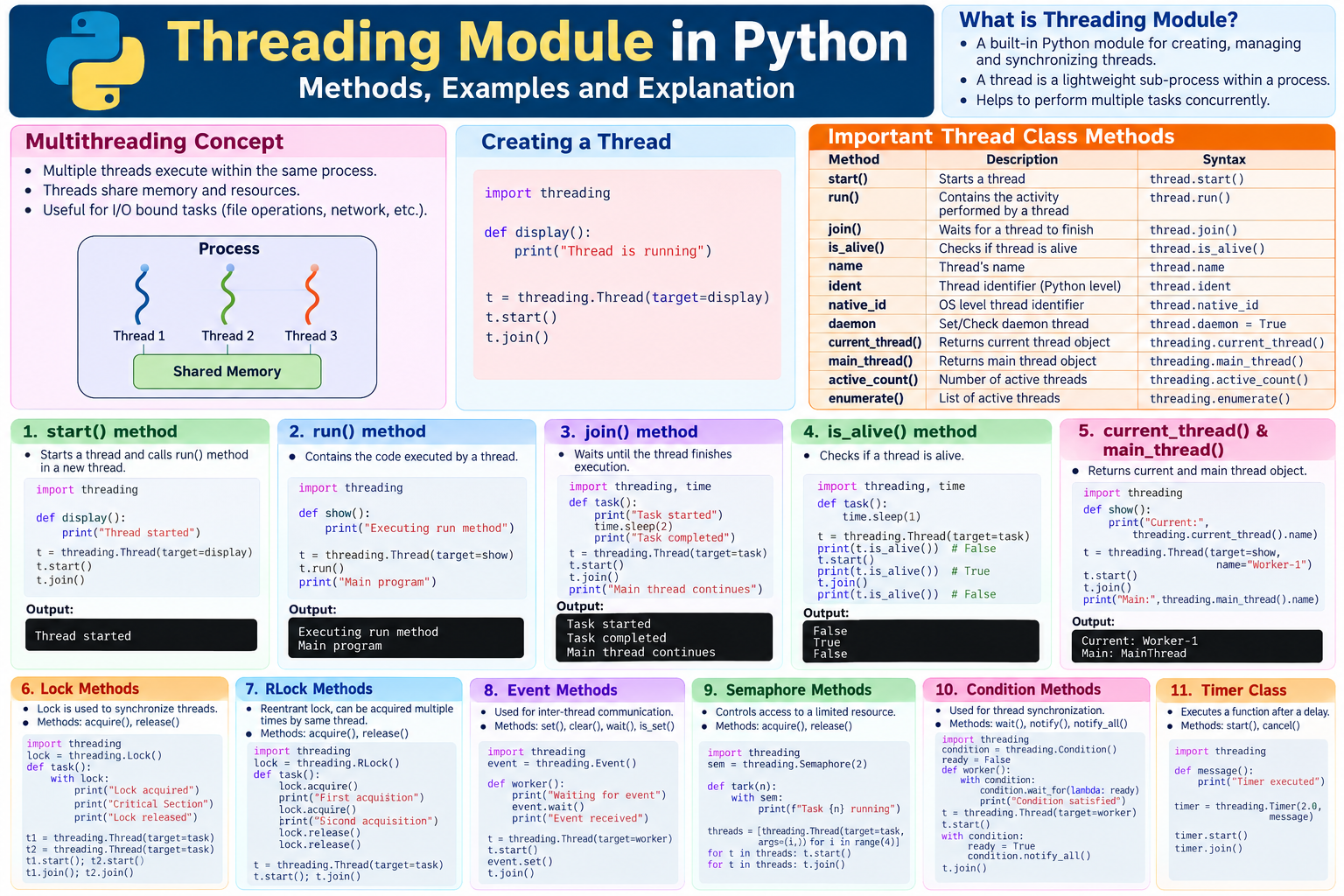
Introduction
Python is a popular programming language used in web development, artificial intelligence, machine learning, automation, and software development. It provides several built-in modules to perform different programming tasks. One important module is the threading module, which supports multithreading.
Multithreading is a technique in which multiple threads execute within the same process. Threads can perform different tasks concurrently, allowing a program to manage several activities without waiting for each task to finish separately.
For example, a program can download files while processing other requests. A desktop application can perform background operations while keeping its interface responsive. Similarly, a Python application can use threads to manage multiple network requests or file operations.
The threading module provides methods to create, start, manage, synchronize, and coordinate threads.
What Is the Threading Module in Python?
The threading module is a standard Python library that provides a high-level interface for working with threads.
A thread is a sequence of instructions that can execute within a process. Threads belonging to the same process share memory and other process resources, although each thread maintains its own execution state and call stack.
To use threading in Python, import the module:
import threadingDefinition
The threading module in Python enables programmers to create and manage multiple threads, coordinate their execution, and synchronize access to shared resources.
Methods Provided by the Threading Module in Python
1. start() Method
The start() method starts a thread and arranges for its run() method to execute in a separate thread of control.
Syntax:
thread.start()Example:
import threadingdef display(): print("Thread is running")t = threading.Thread(target=display)t.start()t.join()print("Main program completed")Output:
Thread is running
Main program completed
Explanation: The Thread() constructor creates a thread object. The target argument specifies the function to execute. The start() method starts the thread, and join() waits for it to finish.
A thread object can normally be started only once.
2. run() Method
The run() method contains the activity performed by a thread. When start() is called, Python invokes run() in the new thread.
Syntax:
thread.run()Example:
import threadingdef show(): print("Executing the run method")t = threading.Thread(target=show)t.run()print("Main program")Output:
Executing the run method
Main program
Explanation: Calling run() directly executes the target function in the current thread. It does not create a new thread.
start()initiates execution in a new thread.run()executes the thread’s activity directly when called as an ordinary method.
3. join() Method
The join() method makes the calling thread wait until another thread finishes, or until an optional timeout expires.
Syntax:
thread.join()thread.join(timeout)Example:
import threadingimport timedef task(): print("Task started") time.sleep(2) print("Task completed")t = threading.Thread(target=task)t.start()t.join()print("Main thread continues")Output:
Task started
Task completed
Main thread continues
Explanation: The main thread waits while the worker thread performs its task. After the worker finishes, the main thread continues.
If a timeout is supplied, the caller stops waiting when the timeout expires, even if the worker is still running. Use is_alive() to check the thread’s status afterward.
4. is_alive() Method
The is_alive() method checks whether a thread has started and has not yet terminated.
Syntax:
thread.is_alive()Example:
import threadingimport timedef task(): time.sleep(1)t = threading.Thread(target=task)print(t.is_alive())t.start()print(t.is_alive())t.join()print(t.is_alive())Possible output:
False
True
False
Explanation: Before starting, the thread is not alive. While it is running, the method normally returns True. After termination, it returns False. Exact timing may vary for very short tasks.
5. current_thread() Function
The current_thread() function returns a Thread object representing the thread that is currently executing.
Syntax:
threading.current_thread()Example:
import threadingdef task(): print(threading.current_thread().name)t = threading.Thread(target=task, name="Worker-1")t.start()t.join()Output:
Worker-1Explanation: The function identifies the executing thread. It is useful for debugging and distinguishing different threads.
6. main_thread() Function
The main_thread() function returns the Thread object corresponding to the program’s main thread.
Example:
import threadingprint(threading.main_thread().name)Output:
MainThreadExplanation: This function helps distinguish the main thread from worker threads.
7. active_count() Function
The active_count() function returns the number of currently active Thread objects.
Example:
import threadingimport timedef task(): time.sleep(2)t = threading.Thread(target=task)t.start()print(threading.active_count())t.join()Possible output:
2Explanation: The count may include the main thread and the worker thread. The exact value depends on which threads are active when the function is called.
8. enumerate() Function
The enumerate() function returns a list of currently active Thread objects.
Example:
import threadingfor t in threading.enumerate(): print(t.name)Possible output:
MainThreadExplanation: If no worker threads are running, the main thread may be the only thread shown. Other active threads may also appear.
9. The daemon Attribute
A daemon thread is a background thread that does not keep the Python process alive when only daemon threads remain.
Modern Python code uses the daemon attribute instead of the deprecated setDaemon() and isDaemon() methods.
Example:
import threadingdef task(): print("Background task")t = threading.Thread(target=task)t.daemon = Trueprint(t.daemon)t.start()t.join()Output:
True
Background task
Explanation: Set the daemon attribute before starting the thread. Daemon threads are useful for background activities that do not need to guarantee completion during shutdown.
10. Lock Methods
A Lock is a synchronization primitive that helps prevent multiple threads from entering a protected critical section simultaneously.
The important methods are:
acquire()— acquires the lock.release()— releases the lock.
Example:
import threadinglock = threading.Lock()count = 0def increment(): global count for _ in range(1000): with lock: count += 1threads = [ threading.Thread(target=increment) for _ in range(5)]for t in threads: t.start()for t in threads: t.join()print(count)Output:
5000Explanation: Five threads each increment the shared variable 1,000 times. The with lock: statement protects the critical section and releases the lock automatically afterward.
Without suitable synchronization, concurrent operations on shared mutable data can produce race conditions.
11. RLock Methods
An RLock, or reentrant lock, allows the same thread to acquire the lock multiple times. The owning thread must release it the corresponding number of times.
Example:
import threadinglock = threading.RLock()with lock: print("First acquisition") with lock: print("Second acquisition")Output:
First acquisition
Second acquisition
Explanation: An RLock is useful when nested functions may need to acquire the same lock. A regular Lock is not reentrant.
12. Event Methods
An Event object allows one thread to signal other threads that an action or condition has occurred.
Important methods:
set()— sets the event flag.clear()— clears the flag.wait()— waits until the flag is set.is_set()— checks whether the flag is set.
Example:
import threadingevent = threading.Event()def worker(): print("Worker waiting") event.wait() print("Worker proceeding")t = threading.Thread(target=worker)t.start()event.set()t.join()Output:
Worker waiting
Worker proceeding
Explanation: The worker waits for the event to be signalled. When set() is called, the worker can continue.
13. Semaphore Methods
A semaphore controls access to a resource that has a limited number of available permits.
Important methods:
acquire()— takes an available permit.release()— returns a permit.
Example:
import threadingsemaphore = threading.Semaphore(2)def task(number): with semaphore: print("Task", number, "is running")threads = [ threading.Thread(target=task, args=(i,)) for i in range(4)]for t in threads: t.start()for t in threads: t.join()Explanation: The semaphore has two permits, so at most two threads can hold permits simultaneously. The order of output may vary.
14. Condition Methods
A Condition object allows threads to wait until a particular condition becomes true. It is often used in producer-consumer applications.
Important methods:
wait()— releases the associated lock and waits for notification.notify()— wakes one waiting thread.notify_all()— wakes all waiting threads.wait_for()— waits until a specified condition becomes true or a timeout occurs.
Example:
import threadingcondition = threading.Condition()ready = Falsedef worker(): global ready with condition: condition.wait_for(lambda: ready) print("Condition satisfied")t = threading.Thread(target=worker)t.start()with condition: ready = True condition.notify_all()t.join()Output:
Condition satisfiedExplanation: The worker waits until ready becomes True. The condition’s lock must be held when calling notify() or notify_all().
15. Barrier Methods
A Barrier allows a fixed number of threads to wait until all participants reach the same synchronization point.
Important methods:
wait()— waits for all participants to arrive.reset()— resets the barrier.abort()— places the barrier into a broken state.
Example:
import threadingbarrier = threading.Barrier(2)def task(name): print(name, "reached barrier") barrier.wait() print(name, "passed barrier")t1 = threading.Thread(target=task, args=("Thread A",))t2 = threading.Thread(target=task, args=("Thread B",))t1.start()t2.start()t1.join()t2.join()Explanation: Both threads must reach the barrier before proceeding. The order of printed lines may vary.
16. Timer Class
A Timer is a thread that waits for a specified interval and then executes a function.
Important methods:
start()— starts the timer.cancel()— cancels the scheduled action if it has not begun.
Example:
import threadingdef message(): print("Timer executed")timer = threading.Timer(2.0, message)timer.start()timer.join()Output:
Timer executedExplanation: The function runs after approximately two seconds. Timing is not guaranteed to be exact, and cancellation cannot stop the callback once it has started.
17. Thread Naming and Identification
Thread objects provide useful attributes for debugging and monitoring:
name— the thread’s name.ident— the thread’s Python-level identifier, when available.native_id— the operating system’s native thread identifier, when available.daemon— indicates whether the thread is a daemon thread.
Example:
import threadingdef task(): t = threading.current_thread() print("Name:", t.name) print("Identifier:", t.ident) print("Native ID:", t.native_id)worker = threading.Thread(target=task, name="MyWorker")worker.start()worker.join()The numeric identifiers can vary between executions and may be reused after a thread terminates.
18. Other Useful Threading Functions
| Function | Purpose |
|---|---|
threading.get_ident() | Returns the current thread’s Python-level identifier. |
threading.get_native_id() | Returns the current thread’s native operating-system identifier. |
threading.stack_size() | Gets or sets the stack size for subsequently created threads, subject to platform limitations. |
threading.settrace() | Sets a tracing function for threads started using the module’s thread-starting machinery. |
threading.setprofile() | Sets a profiling function for threads started using the module’s thread-starting machinery. |
threading.local() | Creates thread-local storage so each thread can maintain its own values. |
The behavior and availability of some functions can depend on the Python version and operating system.
Difference Between Important Threading Methods
| Method | Purpose |
|---|---|
start() | Starts a new thread of execution. |
run() | Executes the thread’s activity when invoked directly. |
join() | Waits for a thread to finish. |
is_alive() | Checks whether a thread is alive. |
current_thread() | Returns the current thread object. |
main_thread() | Returns the main thread object. |
active_count() | Counts active thread objects. |
enumerate() | Lists active thread objects. |
acquire() | Acquires a lock or semaphore permit. |
release() | Releases a lock or semaphore permit. |
wait() | Waits for an event or condition, depending on the object. |
notify() | Notifies a waiting thread through a condition. |
cancel() | Cancels a timer’s pending action when possible. |
Advantages of the Threading Module
- Supports concurrent execution of tasks.
- Helps manage I/O-bound workloads efficiently.
- Allows threads to share process resources.
- Provides synchronization mechanisms for shared data.
- Supports background operations.
- Helps build responsive applications.
Limitations of the Threading Module
- Shared data must be synchronized carefully.
- Incorrect lock usage can lead to deadlocks.
- Thread scheduling can make output order unpredictable.
- Thread creation and coordination introduce overhead.
- The Global Interpreter Lock (GIL) in standard CPython can limit parallel execution of CPU-bound Python bytecode.
- Daemon threads are unsuitable for tasks that must finish reliably before shutdown.
Applications of the Threading Module
The threading module is commonly useful for:
- Downloading files from the internet.
- Managing network connections.
- Performing file operations.
- Running background tasks in desktop applications.
- Monitoring resources and devices.
- Scheduling delayed actions.
- Implementing producer-consumer systems.
- Managing concurrent I/O operations.
For CPU-intensive calculations, multiprocessing or other parallel-computing approaches may be more appropriate, depending on the task and Python implementation.
JNTUH Exam-Oriented Answer: 10 Marks
Question: Explain the methods provided by the Threading module in Python.
Answer:
The threading module is a standard Python library used to create, manage, and synchronize threads. A thread is an independent sequence of execution within a process. Multithreading helps a program manage multiple tasks concurrently.
The important methods and functions are:
start()— starts a thread and arranges for itsrun()method to execute in a separate thread.run()— defines the activity performed by a thread.join()— waits for a thread to terminate.is_alive()— checks whether a thread has started and has not yet terminated.current_thread()— returns the currently executing thread object.main_thread()— returns the main thread object.active_count()— returns the number of active thread objects.enumerate()— returns a list of active thread objects.- Lock methods —
acquire()andrelease()control access to shared resources. - Event methods —
set(),clear(),wait(), andis_set()support thread signalling. - Semaphore methods — manage access to a limited number of resources.
- Condition methods —
wait(),notify(), andnotify_all()coordinate threads. - Timer methods —
start()andcancel()schedule or cancel a delayed action.
Example Program
import threadingdef display(): print("Thread is executing")t = threading.Thread(target=display)t.start()t.join()print("Main thread completed")Output:
Thread is executing
Main thread completed
Conclusion: The threading module provides methods for thread creation, execution, status checking, synchronization, and communication. These methods are useful for building responsive applications and managing concurrent I/O operations.
Frequently Asked Questions
1. What is the threading module in Python?
It is a standard library module that supports thread creation, management, and synchronization.
2. What is the difference between start() and run()?
start() initiates execution in a new thread, whereas calling run() directly executes the activity in the current thread.
3. What is the purpose of join()?
It allows one thread to wait for another thread to finish.
4. What is a daemon thread?
A daemon thread does not keep the Python process alive when only daemon threads remain.
5. What is thread synchronization?
Thread synchronization coordinates access to shared resources to help prevent race conditions and maintain correct program behavior.
6. What is the difference between Lock and RLock?
A regular Lock is not reentrant. An RLock can be acquired repeatedly by its owning thread, provided it is released the corresponding number of times.
7. Can threads run simultaneously?
Threads can make progress concurrently. Actual parallel execution of Python bytecode depends on the Python implementation and runtime configuration.
Final Summary
The Python threading module is an important part of concurrent programming. Its main thread-management methods include start(), run(), join(), and is_alive(). Functions such as current_thread(), active_count(), and enumerate() help inspect thread execution. Synchronization objects such as Lock, RLock, Event, Semaphore, Condition, and Barrier coordinate access to shared resources and communication between threads.
For examinations, focus on the definitions, syntax, examples, outputs, and differences between start(), run(), and join(), along with lock and event operations.