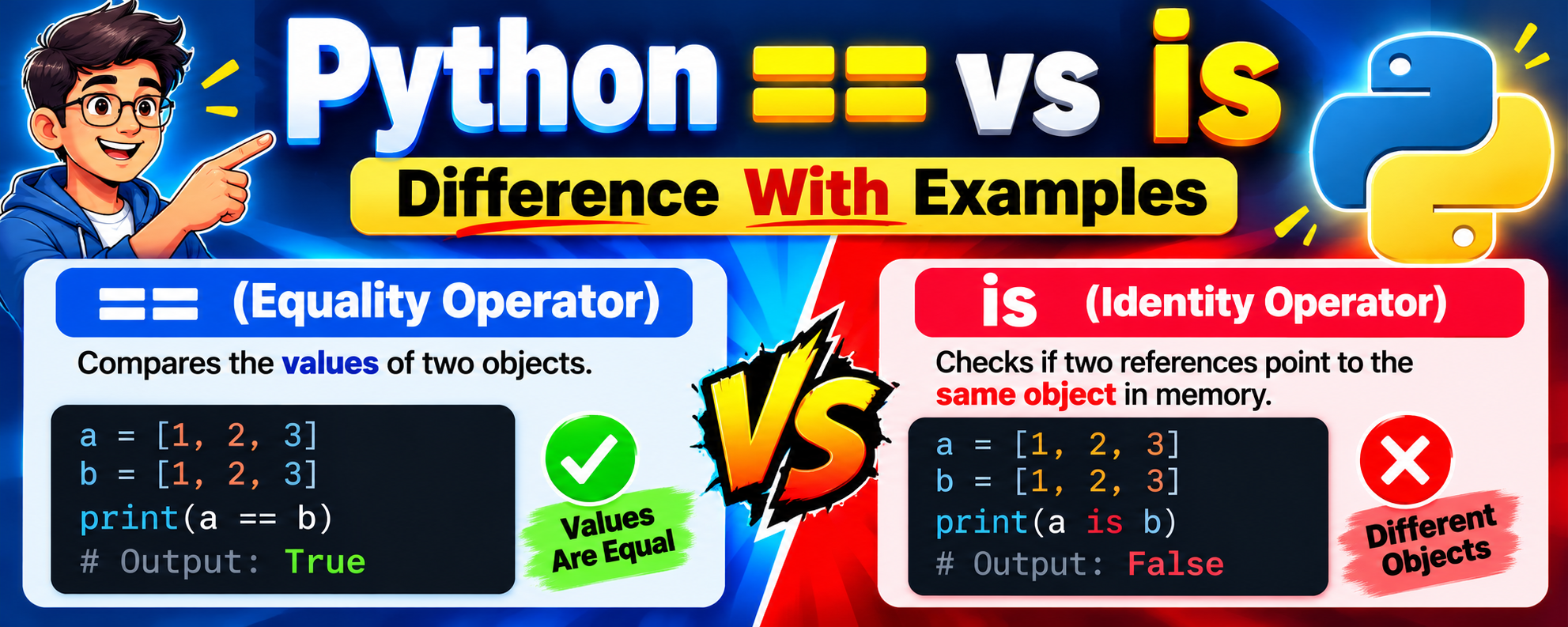
Difference Between == and is in Python: Complete Guide with Examples
Python Programming • Beginner-Friendly Tutorial • Examples and Outputs
Introduction
Python is one of the most popular programming languages used in web development, data science, artificial intelligence, machine learning, automation, and software development. When learning Python, understanding operators is essential because operators help us compare values, perform calculations, and check conditions.
Two important operators in Python are == and is. At first glance, they may appear to perform the same operation because both can return True or False. However, they serve different purposes.
- The
==operator checks whether two objects have equal values. - The
isoperator checks whether two references point to the same object in memory.
Understanding this distinction helps you write correct Python programs, avoid unexpected errors, and understand how Python handles objects, variables, lists, strings, and other data types.
In this tutorial, we will explore the differences between == and is, their syntax, examples, outputs, common mistakes, practical applications, and frequently asked questions.
1. What Is the == Operator in Python?
The == operator is called the equality operator. It compares two values and determines whether they are equal according to the equality rules of their data types.
If the two values are equal, the operator returns True. Otherwise, it returns False.
Syntax
value1 == value2Here:
value1is the first value.value2is the second value.==compares the values.- The result is usually a Boolean value:
TrueorFalse.
Example 1: Comparing two integers
a = 10b = 10print(a == b)Output:
TrueExplanation: Both variables contain the integer value 10. Therefore, the equality operator returns True.
Example 2: Comparing different integers
a = 10b = 20print(a == b)Output:
FalseExplanation: The values 10 and 20 are different, so the result is False.
Example 3: Comparing strings
name1 = "Python"name2 = "Python"print(name1 == name2)Output:
TrueExplanation: Both strings contain the same sequence of characters, so they are equal.
Example 4: Comparing lists
list1 = [1, 2, 3]list2 = [1, 2, 3]print(list1 == list2)Output:
TrueExplanation: Both lists contain the same elements in the same order. The == operator compares their contents, so it returns True, even though the lists can be separate objects.
This is one of the most important points to understand: two different objects can have equal values.
2. What Is the is Operator in Python?
The is operator is called the identity operator. It checks whether two variables refer to the exact same object, rather than simply checking whether their values are equal.
If both variables refer to the same object, is returns True. If they refer to different objects, it returns False.
Syntax
object1 is object2Example 1: Comparing two variables referring to the same object
a = [10, 20, 30]b = aprint(a is b)Output:
TrueExplanation: The variable b refers to the same list object as a. Python does not create a second list when we write b = a. Both variables refer to one object, so a is b returns True.
Example 2: Comparing two separate lists
a = [10, 20, 30]b = [10, 20, 30]print(a is b)Output:
FalseExplanation: Although the lists contain the same values, Python creates two separate list objects. Therefore, a is b returns False.
Notice the difference:
print(a == b) # Trueprint(a is b) # FalseThe first statement compares the list values. The second statement checks whether both variables refer to the same object.
Example 3: Using is with None
result = Noneprint(result is None)Output:
TrueExplanation: None is Python’s special object representing the absence of a value. To check whether a variable is None, Python convention recommends using is None.
For example:
user_name = Noneif user_name is None: print("No username available")Output:
No username availableThis is a common and important real-world use of the is operator.
3. Main Differences Between == and is
The following table summarizes the differences between the two operators.
| Feature | == operator | is operator |
|---|---|---|
| Full name | Equality operator | Identity operator |
| Purpose | Compares values | Compares object identity |
| Checks | Whether values are equal | Whether references point to the same object |
Can return True for different objects? | Yes | No |
| Common use | Comparing numbers, strings, lists, and other values | Checking identity, especially None |
| Example | a == b | a is b |
| Main question | Are they equal? | Are they the same object? |
Remember: == checks equality, while is checks identity.
4. Understanding == and is with a Memory Diagram
Consider this Python program:
a = [1, 2, 3]b = [1, 2, 3]c = aprint(a == b)print(a is b)print(a is c)Output:
True
False
True
The relationship between the variables can be represented like this:
Python variables and objects
Conceptual illustration
a
Reference
b
Reference
c
Reference
Object 1
[1, 2, 3]
a and c
Object 2
[1, 2, 3]
b
Separate objects
Equal contents
a == b→True, because their contents are equal.a is b→False, because they are different objects.a is c→True, because both refer to the same object.
This example demonstrates that equality and identity are two different concepts.
5. Difference Between == and is with Numbers
Numbers provide another way to understand the difference.
Example 1: Equal integer values
x = 1000y = 1000print(x == y)print(x is y)Output:
True
False
The equality comparison returns True because the values are equal. The identity comparison may return False because the variables may refer to different integer objects.
However, the result of is for numbers can depend on Python’s implementation and how objects are created. Some integers are cached or reused, so you must not rely on is to compare numeric values.
For example, the following comparison is commonly True in CPython:
x = 10y = 10print(x is y)This can happen because Python reuses certain integer objects. It does not mean that is is the correct operator for comparing numbers.
Best practice: Use == whenever you want to compare numeric values.
price1 = 100price2 = 100if price1 == price2: print("Prices are equal")Output:
Prices are equal6. Difference Between == and is with Strings
Strings also help illustrate the difference between equality and identity.
Example
s1 = "hello"s2 = "hello"print(s1 == s2)print(s1 is s2)Output:
True
True
In some Python implementations, both variables may refer to the same string object because Python can reuse certain strings through a process called interning.
However, this behavior is not guaranteed for every string.
Consider a string constructed dynamically:
s1 = "".join(["hel", "lo"])s2 = "".join(["he", "llo"])print(s1 == s2)print(s1 is s2)Output:
True
False
Both strings contain "hello", but the operations create separate string objects in this example.
The important lesson is that string interning and object reuse can make is appear to behave like == in some examples. This is not a reliable way to compare strings.
Always use == for string comparisons.
password = "python123"entered_password = "python123"if entered_password == password: print("Values match")7. Difference Between == and is with Lists
Lists are especially useful when learning these operators because two lists with identical contents are usually separate objects.
Example
list1 = [10, 20, 30]list2 = [10, 20, 30]print(list1 == list2)print(list1 is list2)Output:
True
False
The lists are equal in value but not identical in object identity.
What happens when we modify a list?
list1 = [1, 2, 3]list2 = list1list2.append(4)print(list1)print(list2)print(list1 is list2)Output:
[1, 2, 3, 4]
[1, 2, 3, 4]
True
Explanation: The assignment list2 = list1 makes both variables refer to the same list. When the list is modified through list2, the change is visible through list1 as well.
Now compare that with separate lists:
list1 = [1, 2, 3]list2 = [1, 2, 3]list2.append(4)print(list1)print(list2)Output:
[1, 2, 3]
[1, 2, 3, 4]
The two lists are independent objects. Modifying one does not change the other.
8. Difference Between == and is with Tuples
Tuples are immutable sequences, meaning their elements cannot be changed after creation. Nevertheless, two tuples with identical elements can be separate objects.
t1 = (1, 2, 3)t2 = (1, 2, 3)print(t1 == t2)print(t1 is t2)Output:
TrueThe second line may be True or False, depending on how Python creates and reuses the tuple objects. Do not depend on the identity of equal tuples.
To demonstrate identity clearly:
t1 = tuple([1, 2, 3])t2 = tuple([1, 2, 3])print(t1 == t2)print(t1 is t2)Output:
True
False
In this example, the tuple objects are separately created.
The principle remains the same: == compares values, while is checks identity.
9. Difference Between == and is with Dictionaries
Dictionaries store data as key-value pairs. Two dictionaries can contain identical data while remaining separate objects.
d1 = {"name": "Sai", "age": 22}d2 = {"name": "Sai", "age": 22}print(d1 == d2)print(d1 is d2)Output:
True
False
The dictionaries have equal contents, but they are different objects.
Now assign one dictionary to another variable:
d1 = {"name": "Sai", "age": 22}d2 = d1print(d1 == d2)print(d1 is d2)Output:
True
True
Both variables refer to the same dictionary.
This distinction is useful when working with data structures, configuration settings, and application state.
10. Why Is is None Recommended Instead of == None?
One of the most common Python conventions is to check for None using is None.
Correct:
value = Noneif value is None: print("Value is missing")Output:
Value is missingAlthough value == None can work for ordinary objects, it is not the recommended approach.
The reason is that a class can customize equality comparisons. Its objects might compare equal to None without actually being the None object.
For example:
class Example: def __eq__(self, other): return other is Noneobj = Example()print(obj == None)print(obj is None)Output:
True
False
The custom __eq__ method makes the object compare equal to None. However, the object itself is not None.
The is operator checks identity directly and is not affected by a custom equality method.
Use these standard patterns:
if value is None: print("No value")if value is not None: print("A value exists")These are the preferred ways to check for the absence of a value in Python.
11. How Python Implements Equality and Identity
To understand these operators more deeply, it helps to know how Python handles objects.
Equality and the __eq__() method
In Python, the == operator generally uses the equality behavior defined by an object’s type. For custom classes, this behavior can be implemented through the __eq__() method.
Example:
class Student: def __init__(self, name): self.name = name def __eq__(self, other): if not isinstance(other, Student): return NotImplemented return self.name == other.names1 = Student("Sai")s2 = Student("Sai")print(s1 == s2)print(s1 is s2)Output:
True
False
Although s1 and s2 are separate objects, their custom equality method compares their names. Since both names are "Sai", s1 == s2 returns True.
Identity and the is operator
The is operator does not call a class’s __eq__() method to decide whether two references identify the same object.
For the previous example:
print(s1 is s2)Output:
FalseEach call to Student("Sai") creates a new instance, so the two variables refer to different objects.
You can also check an object’s identity using id():
a = [1, 2, 3]b = ac = [1, 2, 3]print(id(a) == id(b))print(id(a) == id(c))Output:
True
False
The id() function returns an identity value for an object during its lifetime. In CPython, this is typically related to the object’s memory address, but Python does not guarantee that id() is literally a memory address on every implementation.
The is operator is the clearer choice when directly checking whether two references identify the same object.
12. Common Mistakes When Using == and is
Mistake 1: Using is to compare numbers
Incorrect:
a = 500b = 500if a is b: print("Equal")This program might print "Equal" in some environments and not in others. It checks object identity rather than numeric equality.
Correct:
a = 500b = 500if a == b: print("Equal")Mistake 2: Using is to compare strings
Incorrect:
name1 = "Python"name2 = "Python"print(name1 is name2)The result may depend on string interning and how the strings were constructed.
Correct:
print(name1 == name2)Mistake 3: Assuming equal lists are identical
Incorrect assumption:
a = [1, 2]b = [1, 2]print(a is b)Output:
FalseEven though the contents match, the lists are separate objects.
Mistake 4: Using == when identity is required
Suppose an application uses None to indicate that a value has not been supplied. Use:
if result is None: print("No result")This directly checks whether the result is the special None object.
Mistake 5: Confusing assignment with comparison
These statements serve different purposes:
a = b # Assignmenta == b # Equality comparisona is b # Identity comparisonThe single equals sign (=) assigns a reference to a variable. The double equals sign (==) compares values, while is compares identity.
13. Practical Applications of == and is
Both operators are useful in real-world Python development, but they are appropriate in different situations.
Application 1: Comparing user input
answer = input("Enter yes or no: ")if answer == "yes": print("You selected yes")Use == because you want to compare the text entered by the user.
Application 2: Checking for missing data
email = Noneif email is None: print("Email has not been provided")Use is None to check whether the variable refers to the None object.
Application 3: Comparing lists of products
products1 = ["Milk", "Curd", "Bread"]products2 = ["Milk", "Curd", "Bread"]if products1 == products2: print("Product lists match")Use == to compare the contents of the product lists.
Application 4: Checking whether two variables share a mutable object
cart1 = ["Milk", "Bread"]cart2 = cart1if cart1 is cart2: print("Both variables refer to the same cart")Use is when the identity of the object matters, such as when checking whether two variables refer to the same mutable list.
Application 5: Working with function results
def find_user(): return Noneuser = find_user()if user is None: print("User not found")This pattern is commonly used when a function returns None to indicate that no result was found.
14. Quick Comparison: Examples and Outputs
The following examples summarize the behavior of the two operators.
| Python expression | Result | Reason |
|---|---|---|
10 == 10 | True | Equal numbers |
10 is 10 | Usually True in CPython | Integer object reuse; not a value-comparison guarantee |
"hi" == "hi" | True | Equal strings |
[1, 2] == [1, 2] | True | Equal list contents |
[1, 2] is [1, 2] | False | Separate list objects |
a is b, where b = a | True | Same object |
None is None | True | Same singleton object |
None == None | True | Equal values |
True == 1 | True | Booleans are a subtype of integers |
True is 1 | False | True and 1 are different objects |
The integer identity example illustrates why you should avoid using is for ordinary value comparisons.
15. Frequently Asked Questions (FAQs)
Q1. What is the main difference between == and is in Python?
The == operator compares values, while the is operator checks whether two variables refer to the same object.
Q2. Can == and is both return True?
Yes. For example:
a = [1, 2, 3]b = aprint(a == b)print(a is b)Output:
True
True
Both operators return True because the values are equal and both variables refer to the same object.
Q3. Why does [1, 2] == [1, 2] return True while is returns False?
Python compares the list contents for equality. However, each list literal creates a separate list object, so their identities differ.
Q4. Should I use is or == to compare strings?
Use ==. It compares the contents of strings, which is normally what you want.
Q5. Should I use is or == to compare integers?
Use ==. Integer object reuse is an implementation detail, so identity is not a reliable way to compare integer values.
Q6. Why should I use is None?
Because None represents the absence of a value, and is None checks its identity directly. It is also the standard Python style.
Q7. What is the difference between is not and !=?
is not checks whether two references identify different objects. != checks whether their values are unequal.
a = [1, 2]b = [1, 2]print(a != b)print(a is not b)Output:
False
True
The lists have equal values, so != returns False. They are separate objects, so is not returns True.
Q8. Does is compare memory addresses?
The is operator checks object identity. In CPython, the value returned by id() is typically associated with the object’s memory address, but this is not a universal Python language guarantee.
Q9. Is is faster than ==?
Identity checks are generally simple, but performance should not determine which operator you choose. Use the operator that expresses the correct meaning. Never replace a value comparison with an identity check just to seek a possible speed improvement.
Q10. Can custom classes change the behavior of ==?
Yes. A class can implement __eq__() to define how its objects compare. The is operator continues to check identity.
16. Practice Questions
Test your understanding with the following interactive quiz.
Python operators quiz
0/5 answered
1. What does `==` compare?Object identityValuesMemory addresses
2. What is the result of `[1, 2] == [1, 2]`?TrueFalseError
3. What is the result of `a is b` when `b = a`?Always FalseTrue while both refer to the same objectAlways an error
4. What is the recommended way to check whether `x` is None?x == Nonex is Nonex = None
5. Which operator should you use to compare two strings by their contents?is==is not
Reset quiz
Conclusion
The difference between == and is is a fundamental concept in Python programming.
The == operator checks whether two objects have equal values. It is the appropriate choice for comparing numbers, strings, lists, tuples, dictionaries, and most other values.
The is operator checks whether two references identify the exact same object. Its most common everyday use is checking whether a value is None.
Remember these two examples:
a = [1, 2, 3]b = [1, 2, 3]print(a == b) # Trueprint(a is b) # FalseAnd:
a = Noneprint(a is None) # TrueThe golden rule: Use == when you want to know whether values are equal. Use is when you want to know whether two references point to the same object. Following this rule will help you write clearer, more reliable Python programs.