Introduction
The Fibonacci series is one of the most popular number sequences in programming. It is commonly used to teach loops, variables, recursion, algorithms, and mathematical logic. If you are learning Python or preparing for programming exams, understanding the Fibonacci series is a useful starting point.
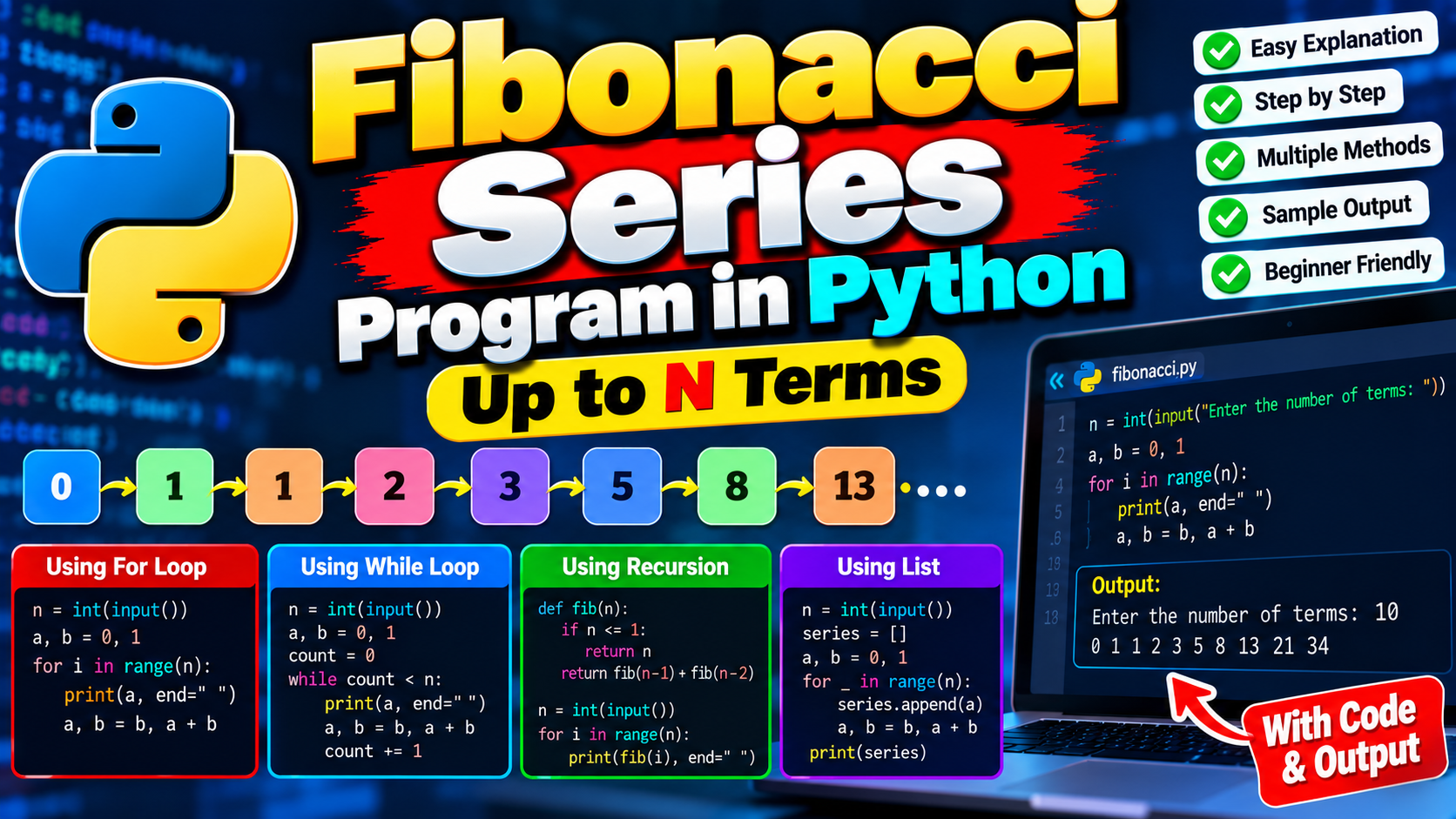
A Fibonacci series program in Python up to N terms prints a sequence in which every number after the first two is the sum of the previous two numbers.
For example, the first 10 terms are:
0, 1, 1, 2, 3, 5, 8, 13, 21, 34
In this tutorial, you will learn how to write a Fibonacci program using a for loop, a while loop, recursion, and an iterative algorithm. You will also learn how to print the series up to a specific value, understand sample outputs, analyze time complexity, and solve common beginner errors.
What Is the Fibonacci Series in Python?
The Fibonacci series is a sequence of numbers that starts with 0 and 1. Each subsequent number is calculated by adding the previous two numbers.
The mathematical rule is:
[
F(n)=F(n-1)+F(n-2)
]
For the standard sequence:
- (F(0)=0)
- (F(1)=1)
- (F(n)=F(n-1)+F(n-2)), for (n\geq2)
For example:
| Position | Calculation | Fibonacci number |
|---|---|---|
| 1 | First term | 0 |
| 2 | Second term | 1 |
| 3 | 0 + 1 | 1 |
| 4 | 1 + 1 | 2 |
| 5 | 1 + 2 | 3 |
| 6 | 2 + 3 | 5 |
| 7 | 3 + 5 | 8 |
| 8 | 5 + 8 | 13 |
| 9 | 8 + 13 | 21 |
| 10 | 13 + 21 | 34 |
The Fibonacci series is useful for understanding sequential calculations, mathematical patterns, and different approaches to solving the same programming problem.
What Is the Algorithm to Print the Fibonacci Series?
An algorithm is a sequence of steps used to solve a problem. Before writing Python code, understand the logic behind generating the Fibonacci series.
Algorithm
- Start the program.
- Read the number of terms,
n, from the user. - Initialize two variables:
a = 0andb = 1. - Repeat the process
ntimes. - Print the current value of
a. - Calculate the next number by adding
aandb. - Update
ato the old value ofbandbto the calculated sum. - Stop after printing the requested number of terms.
This method calculates each term only once and does not require storing the entire series in memory.
Pseudocode
START
INPUT n
a = 0
b = 1

REPEAT n TIMES:
    PRINT a
    next = a + b
    a = b
    b = next

STOP
1. Fibonacci Series Program in Python Using a For Loop
A for loop is one of the easiest ways to generate the Fibonacci series. It is suitable when you already know the number of terms to print.
Python Program
n = int(input("Enter the number of terms: "))

a = 0
b = 1

for i in range(n):
    print(a, end=" ")
    a, b = b, a + b
Output
Enter the number of terms: 10
0 1 1 2 3 5 8 13 21 34
Explanation
nstores the number of terms requested by the user.a = 0initializes the first term.b = 1initializes the second term.range(n)repeats the loop exactlyntimes whennis positive.print(a, end=" ")prints each number on the same line.a, b = b, a + bupdates both variables to generate the next pair.
Python evaluates the expressions on the right side before assigning the new values. This makes the simultaneous assignment convenient for Fibonacci calculations.
Why use a for loop?
Use a for loop when the problem specifies a number of terms, such as printing the first 10, 20, or 50 Fibonacci numbers.
2. Fibonacci Series Program in Python Using a While Loop
A while loop repeats a block of code as long as its condition remains true. It can also generate the Fibonacci series when the number of terms is known.
Python Program
n = int(input("Enter the number of terms: "))

a = 0
b = 1
count = 0

while count < n:
    print(a, end=" ")
    a, b = b, a + b
    count += 1
Output
Enter the number of terms: 7
0 1 1 2 3 5 8
Explanation
The variable count tracks how many terms have been printed.
The condition count < n ensures that the loop runs only until the required number of terms has been generated. After printing a number, the program updates the Fibonacci variables and increases count by one.
Difference between for and while loops
| Feature | For loop | While loop |
|---|---|---|
| Best suited for | A known number of repetitions | Repetition controlled by a condition |
| Counter | Usually handled by range() | Often updated manually |
| Fibonacci logic | Same | Same |
| Beginner difficulty | Usually simpler | Requires careful counter management |
Both approaches have (O(n)) time complexity and (O(1)) auxiliary space when they print terms directly.
3. Fibonacci Series Program in Python Using Recursion
Recursion occurs when a function calls itself to solve a smaller version of a problem. The Fibonacci sequence can be defined recursively using the same mathematical rule.
Python Program
def fibonacci(n):
    if n <= 1:
        return n

    return fibonacci(n - 1) + fibonacci(n - 2)


terms = int(input("Enter the number of terms: "))

for i in range(terms):
    print(fibonacci(i), end=" ")
Output
Enter the number of terms: 8
0 1 1 2 3 5 8 13
Explanation
The function has two important parts:
- Base case: If
nis 0 or 1, the function returnsn. - Recursive case: For larger values, it returns the sum of
fibonacci(n - 1)andfibonacci(n - 2).
The base case prevents the function from continuing indefinitely.
Is recursion efficient?
The simple recursive method is useful for understanding recursion, but it becomes slow as n grows. It recalculates the same Fibonacci values many times.
Its time complexity is approximately (O(2^n)), while its recursion stack requires up to (O(n)) space for a single calculation.
For generating many terms, an iterative solution is generally a better choice.
4. Fibonacci Series Program in Python Using a Function
Functions help organize code into reusable blocks. Instead of printing the sequence directly inside the main program, you can create a function that returns a list of Fibonacci numbers.
Python Program
def fibonacci_series(n):
    series = []
    a, b = 0, 1

    for _ in range(n):
        series.append(a)
        a, b = b, a + b

    return series


terms = int(input("Enter the number of terms: "))

if terms < 0:
    print("Please enter a non-negative integer.")
else:
    print(fibonacci_series(terms))
Output
Enter the number of terms: 10
[0, 1, 1, 2, 3, 5, 8, 13, 21, 34]
Explanation
The function creates an empty list named series. Each generated term is added using append(). After the loop finishes, the function returns the list.
This approach is useful when you want to perform additional operations on the sequence, such as calculating its sum, filtering values, or displaying the numbers in a different format.
Unlike the direct-printing examples, this method uses (O(n)) additional space to store the terms.
5. Fibonacci Series in Python Up to a Given Number
Sometimes a question asks you to print all Fibonacci numbers below a specific limit instead of printing a fixed number of terms.
For example, if the limit is 50, the program should print:
0 1 1 2 3 5 8 13 21 34
The next Fibonacci number is 55, which exceeds the limit.
Python Program
limit = int(input("Enter the maximum limit: "))

a, b = 0, 1

while a <= limit:
    print(a, end=" ")
    a, b = b, a + b
Output
Enter the maximum limit: 50
0 1 1 2 3 5 8 13 21 34
The condition a <= limit controls the loop. If the question requires numbers strictly below the limit, replace it with a < limit.
Important: “Up to N terms” and “up to a number N” are different requirements. The first specifies how many values to print; the second specifies the maximum permitted value.
6. Fibonacci Series Program Using a List
A list is useful when you need to access individual terms later. For example, you may want the fifth term, the tenth term, or the complete series.
Python Program
n = int(input("Enter the number of terms: "))

series = []

for i in range(n):
    if i == 0:
        series.append(0)
    elif i == 1:
        series.append(1)
    else:
        series.append(series[i - 1] + series[i - 2])

print("Fibonacci series:", series)
Output
Enter the number of terms: 6
Fibonacci series: [0, 1, 1, 2, 3, 5]
This version uses previously stored values to calculate each new term. It is straightforward to understand and demonstrates how lists can be used in sequence-based problems.
However, the two-variable method is more space-efficient if you only need to print the numbers.
7. Fibonacci Series Using Memoization
Memoization is an optimization technique that stores previously calculated results so they do not need to be computed again.
It makes the recursive Fibonacci method much more efficient.
Python Program
from functools import lru_cache


@lru_cache(maxsize=None)
def fibonacci(n):
    if n <= 1:
        return n

    return fibonacci(n - 1) + fibonacci(n - 2)


terms = int(input("Enter the number of terms: "))

if terms < 0:
    print("Please enter a non-negative integer.")
else:
    for i in range(terms):
        print(fibonacci(i), end=" ")
Output
Enter the number of terms: 10
0 1 1 2 3 5 8 13 21 34
The decorator @lru_cache(maxsize=None) caches function results. Once a Fibonacci value has been calculated, later calls can reuse it.
Memoization reduces the time complexity for calculating the first n terms to (O(n)), with (O(n)) storage for cached results. Recursion depth remains a consideration for large inputs.
This method is valuable when you specifically want to learn optimized recursion.
8. Fibonacci Series Program Using Iteration
Iteration means repeatedly executing instructions using loops. The standard two-variable Fibonacci solution is an iterative algorithm.
Python Program
def fibonacci(n):
    a, b = 0, 1

    for _ in range(n):
        yield a
        a, b = b, a + b


terms = int(input("Enter the number of terms: "))

if terms < 0:
    print("Please enter a non-negative integer.")
else:
    print(*fibonacci(terms))
Output
Enter the number of terms: 7
0 1 1 2 3 5 8
The yield keyword makes the function a generator. Instead of returning a complete list, it produces each term as it is requested.
This approach is useful for processing a sequence one value at a time. The generator maintains only a small amount of state, so it does not need to store every term.
Which Fibonacci Algorithm Is Best?
The best algorithm depends on your requirements. For most beginner exercises, the iterative approach using two variables is the simplest efficient solution.
| Method | Time complexity for first n terms | Additional space | Best use |
|---|---|---|---|
| For loop with two variables | (O(n)) | (O(1)) | Basic programming exercises |
| While loop with two variables | (O(n)) | (O(1)) | Condition-controlled loops |
| Simple recursion | Exponential overall | (O(n)) stack depth | Learning recursion |
| Function returning a list | (O(n)) | (O(n)) | Storing and reusing terms |
| Memoized recursion | (O(n)) | (O(n)) cache and stack | Learning optimized recursion |
| Generator | (O(n)) | (O(1)) auxiliary state | Producing terms one at a time |
These space estimates exclude the storage needed for the final output. If you store all terms in a list, the list itself requires (O(n)) space.
Common Errors in Fibonacci Series Programs
Beginners often make small mistakes when writing a Fibonacci program. Understanding them will help you debug your code.
1. Incorrect initial values
The standard Fibonacci sequence begins with 0 and 1.
a, b = 0, 1Some explanations use 1 and 1 as the first two values. That is a different starting convention. Follow the sequence required by your question.
2. Updating variables incorrectly
Incorrect update logic can skip values or repeat the wrong numbers.
Use simultaneous assignment:
a, b = b, a + bPython evaluates the right-hand side before assigning the new values.
3. Printing one extra term
When printing exactly n terms, use:
for i in range(n):For a positive n, this loop runs exactly n times.
4. Forgetting to update the counter
In a while loop, forgetting count += 1 can cause an infinite loop because the condition may never become false.
5. Not handling zero or negative input
If the user enters 0, the program should print no terms. A negative number of terms is invalid for this task and should produce a helpful message.
6. Using recursion for very large inputs
Basic recursion repeats calculations and can become slow or exceed Python’s recursion limit. Prefer an iterative method for large sequences.
Fibonacci Series Program in Python: Important Test Cases
Test your code with different values to check that it behaves correctly.
| Input (number of terms) | Expected output |
|---|---|
| 0 | No terms |
| 1 | 0 |
| 2 | 0 1 |
| 5 | 0 1 1 2 3 |
| 7 | 0 1 1 2 3 5 8 |
| 10 | 0 1 1 2 3 5 8 13 21 34 |
For production-quality code, validate that input is an integer and handle invalid input such as letters or decimal values. The basic examples above assume that the user enters an integer.
Applications of the Fibonacci Series
The Fibonacci sequence is more than a classroom exercise. It provides an accessible example of concepts used in computer science and mathematics.
- Learning algorithms: Demonstrates how a problem can be solved using iteration, recursion, and dynamic programming.
- Understanding recursion: Shows how a function can solve a problem by calling itself with smaller inputs.
- Dynamic programming: Illustrates how storing earlier results avoids repeated calculations.
- Mathematical exploration: Connects programming with number sequences and patterns.
- Algorithm analysis: Helps students compare time and space complexity.
- Further computer science study: Provides a simple starting point for learning memoization and sequence generation.
Fibonacci numbers and related mathematical patterns also appear in discussions of natural forms and the golden ratio. However, not every spiral or pattern found in nature follows an exact Fibonacci relationship.
Frequently Asked Questions (FAQs)
1. How do I print the Fibonacci series in Python up to N terms?
Initialize a = 0 and b = 1, then repeat n times. Print a and update the values using a, b = b, a + b.
n = 10
a, b = 0, 1

for _ in range(n):
    print(a, end=" ")
    a, b = b, a + b
2. What is the output of the Fibonacci series for 10 terms?
The first 10 terms of the standard Fibonacci series are:
0 1 1 2 3 5 8 13 21 34
3. Can I generate the Fibonacci series using a while loop?
Yes. Initialize the first two terms and use a counter in a while loop. Continue while count < n, printing each value and updating the variables.
4. What is the difference between Fibonacci series and Fibonacci sequence?
The terms are often used interchangeably in programming tutorials. Both refer to the ordered sequence of Fibonacci numbers generated by adding the previous two terms, although mathematical contexts may distinguish a finite series from an infinite sequence.
5. Why is recursion slow for the Fibonacci series?
Basic recursion calculates many of the same values repeatedly. Memoization can reuse previous results, while an iterative algorithm avoids this repeated work entirely.
6. How do I print Fibonacci numbers up to a limit?
Use a while loop that continues while the current Fibonacci number is less than or equal to the limit. Update the two variables after printing each term.
7. What is the time complexity of the iterative Fibonacci program?
Generating n terms using a two-variable loop takes (O(n)) time and (O(1)) auxiliary space, excluding output storage.
8. Is the Fibonacci series program important for Python exams?
It is a useful practice problem for loops, functions, recursion, and algorithms. Whether it appears in a specific examination depends on that exam’s syllabus and question paper.
9. Can Python handle large Fibonacci numbers?
Yes. Python integers can grow beyond fixed-width integer limits, subject to available memory and processing time. Extremely large calculations can still be expensive.
10. Which method should beginners learn first?
Start with the for loop using two variables. After understanding the logic, practice the while loop and recursion to learn different programming techniques.
Conclusion
The Fibonacci series is a fundamental Python programming exercise that teaches number sequences, loops, functions, recursion, and algorithm efficiency.
If you want the simplest and most efficient solution for generating a specified number of terms, use a for loop with two variables:
n = int(input("Enter the number of terms: "))
a, b = 0, 1

for _ in range(n):
    print(a, end=" ")
    a, b = b, a + b
Once you understand this program, try the while-loop, recursive, memoized, and generator versions. Comparing them will strengthen your Python fundamentals and prepare you for more advanced programming problems.
Suggested Internal Links for BTechFAQA
Add internal links where the related pages already exist:
- Python Pattern Programs
- Python Programs with Output
- Python Programming for Beginners
- Python Number Programs
- Python Functions and Recursion
Use descriptive anchor text and link only to published, relevant pages on your website.
Image SEO Recommendations
Featured image title: Fibonacci Series Program in Python
Alt text: Fibonacci Series Program in Python with code and output
Image filename: fibonacci-series-program-in-python.webp
Image caption: Learn how to generate the Fibonacci series in Python using loops, recursion, and efficient algorithms.
Use a clear, compressed image with readable text. Keep the main keyword natural in the alt text; do not repeat the same keyword unnaturally across every image.
On-Page SEO and AIO Checklist
- Include the primary keyword in the SEO title, H1, introduction, and a relevant subheading.
- Keep the permalink short and descriptive.
- Place a direct answer near the beginning of the article.
- Include clear algorithms, code blocks, and expected outputs.
- Use tables to compare methods and complexity.
- Include FAQs that answer real beginner questions.
- Test all code examples before publishing.
- Add internal links to relevant, existing Python tutorials.
- Cite authoritative documentation where it supports a technical claim.
- Use descriptive image filenames and alt text.
- Keep headings logical and paragraphs easy to scan.
- Add structured data only when it accurately represents the visible page and meets the relevant search engine guidelines.
- Review the article periodically to keep examples and technical explanations accurate.
Authoritative References
- Python documentation: https://docs.python.org/3/tutorial/
- Python built-in functions: https://docs.python.org/3/library/functions.html
- Python
functoolsdocumentation: https://docs.python.org/3/library/functools.html