JNTUH B.Tech CSE/AIML – Python Practical Lab Programs
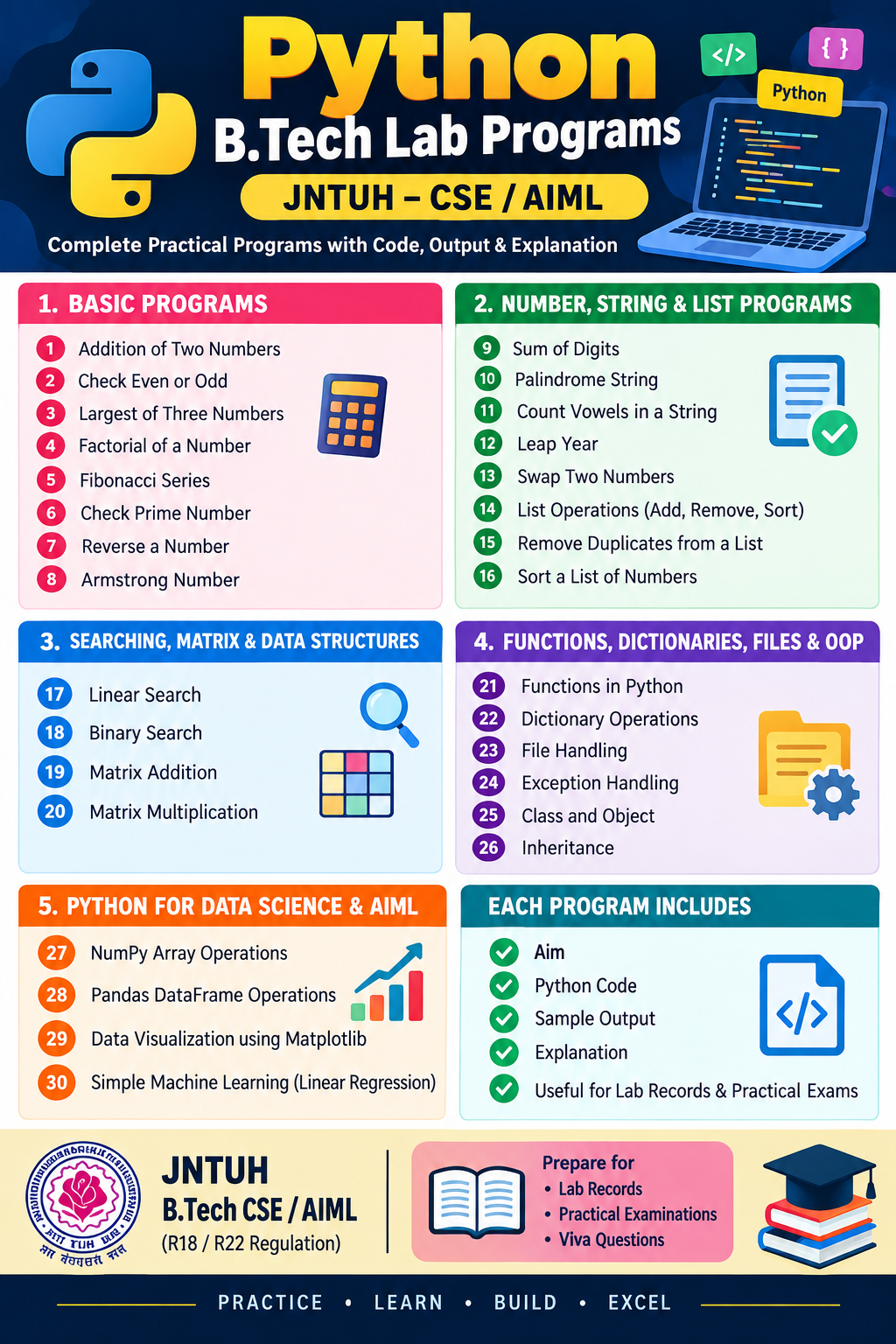
These Python programs are organized for B.Tech practical examinations, lab records, and viva preparation. Each program includes Aim, Code, Sample Output, and Explanation.
The list covers core Python programming first, followed by data structures, file handling, NumPy, Pandas, visualization, and introductory machine learning. Exact experiments may vary by JNTUH regulation (R18, R22, etc.) and subject syllabus.
Part 1: Basic Python Programs
1. Addition of Two Numbers
Aim: To write a Python program to add two numbers.
Code
a = int(input("Enter first number: "))b = int(input("Enter second number: "))sum = a + bprint("Sum =", sum)Output
Enter first number: 10
Enter second number: 20
Sum = 30
Explanation: The input() function reads values from the user. int() converts them into integers, and the + operator adds the numbers.
2. Check Whether a Number Is Even or Odd
Aim: To determine whether a given integer is even or odd.
Code
n = int(input("Enter a number: "))if n % 2 == 0: print("Even number")else: print("Odd number")Output
Enter a number: 7
Odd number
Explanation: The modulus operator % returns the remainder. A number divisible by 2 with remainder zero is even; otherwise, it is odd.
3. Find the Largest of Three Numbers
Aim: To find the largest among three numbers.
Code
a = int(input("Enter first number: "))b = int(input("Enter second number: "))c = int(input("Enter third number: "))if a >= b and a >= c: largest = aelif b >= a and b >= c: largest = belse: largest = cprint("Largest =", largest)Output
Enter first number: 15
Enter second number: 25
Enter third number: 10
Largest = 25
Explanation: The if, elif, and else statements compare the three values and select the largest.
4. Find the Factorial of a Number
Aim: To calculate the factorial of a non-negative integer.
Code
n = int(input("Enter a number: "))if n < 0: print("Factorial is not defined")else: fact = 1 for i in range(1, n + 1): fact *= i print("Factorial =", fact)Output
Enter a number: 5
Factorial = 120
Explanation: Factorial is the product of all positive integers up to the given number. For example, \(5! = 5 \times 4 \times 3 \times 2 \times 1 = 120\). The factorial of zero is 1.
5. Generate the Fibonacci Series
Aim: To generate the first n terms of the Fibonacci series.
Code
n = int(input("Enter number of terms: "))a, b = 0, 1for i in range(n): print(a, end=" ") a, b = b, a + bOutput
Enter number of terms: 7
0 1 1 2 3 5 8
Explanation: Each term after the first two is the sum of the previous two terms. Multiple assignment updates both variables in each iteration.
6. Check Whether a Number Is Prime
Aim: To check whether a number is prime.
Code
n = int(input("Enter a number: "))if n < 2: print("Not a prime number")else: prime = True for i in range(2, int(n ** 0.5) + 1): if n % i == 0: prime = False break if prime: print("Prime number") else: print("Not a prime number")Output
Enter a number: 13
Prime number
Explanation: A prime number has exactly two positive divisors: 1 and itself. Testing divisors up to the square root of n is sufficient.
7. Reverse a Number
Aim: To reverse the digits of an integer.
Code
n = int(input("Enter a number: "))original = nn = abs(n)reverse = 0while n > 0: digit = n % 10 reverse = reverse * 10 + digit n //= 10if original < 0: reverse = -reverseprint("Reversed number =", reverse)Output
Enter a number: 1234
Reversed number = 4321
Explanation: % 10 extracts the last digit, and // 10 removes it. Repeatedly doing this builds the reversed number.
8. Check Whether a Number Is an Armstrong Number
Aim: To check whether a number equals the sum of its digits raised to the number of digits.
Code
n = int(input("Enter a number: "))if n < 0: print("Not an Armstrong number")else: digits = str(n) power = len(digits) total = sum(int(d) ** power for d in digits) if total == n: print("Armstrong number") else: print("Not an Armstrong number")Output
Enter a number: 153
Armstrong number
Explanation: For 153, \(1^3 + 5^3 + 3^3 = 153\). Since the sum equals the original number, 153 is an Armstrong number.
Part 2: Number, String, and List Programs
9. Find the Sum of Digits
Aim: To calculate the sum of all digits in a number.
Code
n = abs(int(input("Enter a number: ")))total = 0while n > 0: total += n % 10 n //= 10print("Sum of digits =", total)Output
Enter a number: 1234
Sum of digits = 10
Explanation: The remainder operator extracts each digit, and the loop adds each digit to total.
10. Check Whether a String Is a Palindrome
Aim: To determine whether a string reads the same forward and backward.
Code
s = input("Enter a string: ").lower()if s == s[::-1]: print("Palindrome")else: print("Not a palindrome")Output
Enter a string: MADAM
Palindrome
Explanation: The slicing expression [::-1] reverses the string. The program compares the original lowercase string with its reverse.
11. Count Vowels in a String
Aim: To count vowels in a given string.
Code
s = input("Enter a string: ").lower()count = 0for ch in s: if ch in "aeiou": count += 1print("Number of vowels =", count)Output
Enter a string: Engineering
Number of vowels = 5
Explanation: The loop examines each character. If it is one of a, e, i, o, or u, the counter increases.
12. Check Whether a Year Is a Leap Year
Aim: To check whether a given year is a leap year.
Code
year = int(input("Enter year: "))if year % 400 == 0 or ( year % 4 == 0 and year % 100 != 0): print("Leap year")else: print("Not a leap year")Output
Enter year: 2024
Leap year
Explanation: A year is a leap year if it is divisible by 400, or divisible by 4 but not by 100.
13. Swap Two Numbers
Aim: To exchange the values of two variables.
Code
a = int(input("Enter a: "))b = int(input("Enter b: "))a, b = b, aprint("After swapping:")print("a =", a)print("b =", b)Output
Enter a: 10
Enter b: 20
After swapping:
a = 20
b = 10
Explanation: Python supports multiple assignment, allowing two variables to exchange their values without a temporary variable.
14. Perform List Operations
Aim: To demonstrate adding, removing, sorting, and accessing list elements.
Code
numbers = [30, 10, 40, 20]numbers.append(50)numbers.remove(10)numbers.sort()print("List:", numbers)print("First element:", numbers[0])print("Length:", len(numbers))Output
List: [20, 30, 40, 50]
First element: 20
Length: 4
Explanation: Lists store multiple values. append() adds an element, remove() deletes a matching element, sort() arranges the values, and len() returns the list length.
15. Remove Duplicate Elements from a List
Aim: To remove duplicates while preserving the original order.
Code
numbers = [10, 20, 10, 30, 20, 40]unique = []for n in numbers: if n not in unique: unique.append(n)print("Original list:", numbers)print("Unique list:", unique)Output
Original list: [10, 20, 10, 30, 20, 40]
Unique list: [10, 20, 30, 40]
Explanation: Each element is added to the new list only if it has not already appeared.
16. Sort a List of Numbers
Aim: To arrange list elements in ascending order.
Code
numbers = [45, 12, 78, 23, 9]numbers.sort()print("Ascending order:", numbers)print("Descending order:", sorted(numbers, reverse=True))Output
Ascending order: [9, 12, 23, 45, 78]
Descending order: [78, 45, 23, 12, 9]
Explanation: sort() modifies the original list in place. sorted() returns a sorted list, and reverse=True arranges it in descending order.
Part 3: Searching, Matrix, and Data Structure Programs
17. Linear Search
Aim: To search for an element by checking each list item sequentially.
Code
numbers = [10, 20, 30, 40, 50]key = int(input("Enter element to search: "))for i in range(len(numbers)): if numbers[i] == key: print("Element found at index", i) breakelse: print("Element not found")Output
Enter element to search: 30
Element found at index 2
Explanation: Linear search checks elements one by one until it finds the target or reaches the end of the list. Its worst-case time complexity is \(O(n)\).
18. Binary Search
Aim: To find an element in a sorted list using binary search.
Code
numbers = [10, 20, 30, 40, 50, 60]key = int(input("Enter element to search: "))low = 0high = len(numbers) - 1found = Falsewhile low <= high: mid = (low + high) // 2 if numbers[mid] == key: print("Element found at index", mid) found = True break elif numbers[mid] < key: low = mid + 1 else: high = mid - 1if not found: print("Element not found")Output
Enter element to search: 40
Element found at index 3
Explanation: Binary search compares the target with the middle element and repeatedly halves the search range. The input list must be sorted. Its time complexity is \(O(\log n)\).
19. Matrix Addition
Aim: To add two matrices of the same dimensions.
Code
A = [[1, 2], [3, 4]]B = [[5, 6], [7, 8]]C = [ [A[i][j] + B[i][j] for j in range(2)] for i in range(2)]for row in C: print(row)Output
[6, 8]
[10, 12]
Explanation: Each element of the first matrix is added to the corresponding element of the second matrix.
20. Matrix Multiplication
Aim: To multiply two compatible matrices.
Code
A = [[1, 2], [3, 4]]B = [[5, 6], [7, 8]]C = [[0, 0], [0, 0]]for i in range(2): for j in range(2): for k in range(2): C[i][j] += A[i][k] * B[k][j]for row in C: print(row)Output
[19, 22]
[43, 50]
Explanation: Matrix multiplication multiplies elements from each row of the first matrix by the corresponding column of the second matrix, then adds the products.
Part 4: Functions, Dictionaries, Files, and OOP
21. Demonstrate Functions in Python
Aim: To define and call a function that returns the square of a number.
Code
def square(n): return n * nnum = int(input("Enter a number: "))print("Square =", square(num))Output
Enter a number: 6
Square = 36
Explanation: The def keyword defines a function. The return statement sends the computed result back to the caller.
22. Perform Dictionary Operations
Aim: To create, access, update, and display dictionary values.
Code
student = { "name": "Charan", "branch": "CSE", "year": 3}print("Name:", student["name"])student["year"] = 4student["college"] = "JNTUH"print("Student details:", student)Output
Name: Charan
Student details: {'name': 'Charan', 'branch': 'CSE', 'year': 4, 'college': 'JNTUH'}
Explanation: A dictionary stores data as key-value pairs. Values can be accessed using keys, updated, or extended with new entries.
23. File Handling in Python
Aim: To write data to a file and read it back.
Code
with open("student.txt", "w") as file: file.write("Python Practical Lab")with open("student.txt", "r") as file: content = file.read()print("File content:", content)Output
File content: Python Practical LabExplanation: The "w" mode creates or overwrites a file, while "r" reads it. The with statement automatically closes the file after the operation.
24. Exception Handling
Aim: To handle division-by-zero errors using try and except.
Code
try: a = int(input("Enter numerator: ")) b = int(input("Enter denominator: ")) result = a / b print("Result =", result)except ZeroDivisionError: print("Cannot divide by zero")except ValueError: print("Enter valid integers")Output
Enter numerator: 10
Enter denominator: 0
Cannot divide by zero
Explanation: The try block contains potentially problematic operations. The relevant except block handles an error without terminating the program unexpectedly.
25. Class and Object
Aim: To demonstrate classes and objects using a student class.
Code
class Student: def __init__(self, name, marks): self.name = name self.marks = marks def display(self): print("Name:", self.name) print("Marks:", self.marks)s1 = Student("Charan", 90)s1.display()Output
Name: Charan
Marks: 90
Explanation: A class defines the structure and behavior of objects. The constructor __init__() initializes attributes, and self refers to the current object.
26. Demonstrate Inheritance
Aim: To implement single inheritance in Python.
Code
class Person: def display_name(self): print("Name: Charan")class Student(Person): def display_branch(self): print("Branch: CSE-AIML")s = Student()s.display_name()s.display_branch()Output
Name: Charan
Branch: CSE-AIML
Explanation: The Student class inherits the display_name() method from Person. This demonstrates code reuse through inheritance.
Part 5: Python for Data Science and AIML
For these programs, install the required libraries in your Python environment if they are not already available:
python -m pip install numpy pandas matplotlib scikit-learn27. NumPy Array Operations
Aim: To create arrays and perform basic mathematical operations using NumPy.
Code
import numpy as npa = np.array([10, 20, 30, 40])print("Array:", a)print("Sum:", np.sum(a))print("Mean:", np.mean(a))print("Maximum:", np.max(a))Output
Array: [10 20 30 40]
Sum: 100
Mean: 25.0
Maximum: 40
Explanation: NumPy provides efficient numerical arrays and mathematical functions, which are widely used in scientific computing and machine learning.
28. Pandas DataFrame Operations
Aim: To create and display a DataFrame using Pandas.
Code
import pandas as pddata = { "Name": ["Ravi", "Charan", "Sai"], "Marks": [85, 90, 78]}df = pd.DataFrame(data)print(df)print("Average marks:", df["Marks"].mean())Output
     Name  Marks
0    Ravi     85
1  Charan     90
2     Sai     78

Average marks: 84.33333333333333
Explanation: A DataFrame is a two-dimensional table with labeled rows and columns. Pandas makes it easy to clean, analyze, and summarize data.
29. Plot a Graph Using Matplotlib
Aim: To draw a line graph representing values over time.
Code
import matplotlib.pyplot as pltmonths = [1, 2, 3, 4, 5]sales = [10, 15, 12, 20, 25]plt.plot(months, sales, marker="o")plt.xlabel("Month")plt.ylabel("Sales")plt.title("Monthly Sales")plt.grid(True)plt.show()Output
The program displays a line graph titled Monthly Sales, with month numbers on the x-axis and sales values on the y-axis.
Explanation: Matplotlib is a plotting library used to visualize numerical data. The plot() function creates the line graph, and show() displays it.
30. Simple Machine Learning Using Linear Regression
Aim: To train a linear regression model and predict an output from an input value.
Code
from sklearn.linear_model import LinearRegression# Training dataX = [[1], [2], [3], [4], [5]]y = [2, 4, 6, 8, 10]model = LinearRegression()model.fit(X, y)prediction = model.predict([[6]])print("Predicted value:", prediction[0])Output
Predicted value: 12.0Explanation: Linear regression learns a relationship between input and output values. The fit() method trains the model, and predict() estimates the output for a new input. This example uses a simple dataset where the relationship is \(y = 2x\).